
Clean Image AI-Powered Photo Cleanup
Clean Image is a private AI photo cleanup tool that removes text, logos, and blemishes entirely within your browser for instant results.
Visit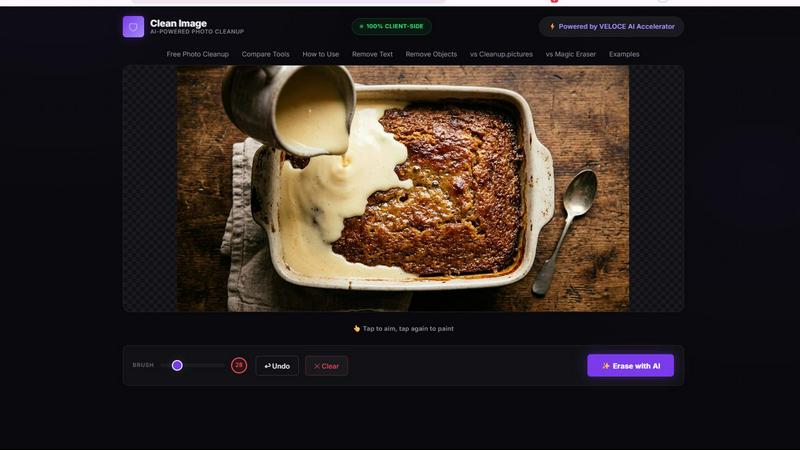
About Clean Image AI-Powered Photo Cleanup
Clean Image AI-Powered Photo Cleanup is a free, browser-based tool that leverages advanced artificial intelligence to remove unwanted elements from your photos. The product is designed for anyone who needs to clean up images quickly and efficiently, including graphic designers, social media managers, e-commerce sellers, marketers, and everyday users. Its core value proposition lies in its commitment to privacy and accessibility: all processing happens entirely within your browser using ONNX Runtime Web and WebAssembly, meaning no images are ever uploaded to a server or leave your device. There are no accounts to create and no subscriptions to pay for. The tool is powered by the OpenCV LaMa inpainting neural network, which intelligently reconstructs areas you brush over by analyzing surrounding pixels. This makes it exceptionally effective for removing text overlays, logos, date stamps, watermarks, and small blemishes, particularly on images with clean backgrounds. Clean Image also features the VELOCE AI Accelerator for optimized performance. After an initial one-time download of the AI model (approximately 89 MB), the model caches in your browser, enabling instant, offline-like processing on subsequent visits with zero data usage. Whether for personal projects or commercial use, Clean Image offers a powerful, private, and cost-free solution for photo restoration and cleanup.
Features of Clean Image AI-Powered Photo Cleanup
100% Private and Client-Side Processing
The most significant feature of Clean Image is its unwavering commitment to privacy. All image processing is executed locally on your device using ONNX Runtime Web and WebAssembly. This architecture ensures that your images are never transmitted to an external server, stored in the cloud, or accessed by any third party. Your photos remain entirely within your browser's sandboxed environment, providing absolute data security and confidentiality. This is especially critical for users handling sensitive or proprietary visual content, as it eliminates any risk of data breaches or unauthorized use.
AI-Powered Inpainting with LaMa Neural Network
At the heart of Clean Image is the OpenCV LaMa inpainting model, a state-of-the-art AI algorithm designed for image reconstruction. When you brush over an area you wish to remove, the AI does not simply blur or clone the surrounding area. Instead, it intelligently analyzes the context, textures, colors, and patterns of the surrounding pixels to generate a realistic and seamless fill. This advanced neural network is particularly adept at handling text, logos, and date stamps, producing results that look natural and are often indistinguishable from the original background.
Instant Performance After Initial Load
Clean Image is designed for efficiency and speed. The first time you use the tool, it downloads the AI model (around 89 MB) and caches it directly in your browser. On all subsequent visits, the model loads instantly from the cache, requiring zero additional data usage. This means that after the initial setup, you can process images immediately with no waiting for downloads or server responses. The VELOCE AI Accelerator further optimizes the inference speed, ensuring that the erasing process is fast and responsive, making it a highly practical tool for repetitive or batch tasks.
Simple and Intuitive Brush and Erase Workflow
The user interface is built around a straightforward brush and erase mechanism, making the tool accessible to users of all skill levels. You simply use a brush tool to paint over the unwanted elements in your image, such as text overlays, logos, timestamps, or small objects. Once you have highlighted the areas for removal, you click the Erase button. The AI then processes your selection and reconstructs the painted areas. This intuitive workflow eliminates the need for complex selection tools or layer management, allowing you to achieve professional-looking results with just a few clicks.
Use Cases of Clean Image AI-Powered Photo Cleanup
Removing Watermarks and Logos for Content Repurposing
Content creators and marketers often need to use images that have been marred by watermarks, stock photo logos, or branding overlays. Clean Image provides a quick and effective solution for removing these elements. By simply brushing over the logo or watermark, the AI inpainting model seamlessly reconstructs the underlying image. This allows users to repurpose visuals for social media posts, blog graphics, or marketing materials without the distraction of unwanted branding, all while maintaining the original image's integrity and visual quality.
Cleaning Up Screenshots for Documentation and Tutorials
Technical writers, educators, and software developers frequently use screenshots in their documentation and tutorials. These screenshots often contain unwanted UI elements like date stamps, notification badges, browser toolbars, or sensitive information. Clean Image enables users to easily remove these distractions. By erasing the date stamp in the corner or a pop-up notification, the resulting screenshot becomes cleaner, more focused, and more professional for use in user manuals, help guides, or online courses, improving the clarity of the instruction.
Erasing Timestamps and Overlays from Personal Photos
For personal use, Clean Image is perfect for cleaning up family photos and memories. Many digital cameras and smartphones automatically add date stamps to photos, which can be visually distracting and detract from the image's aesthetic. Similarly, photos taken at events might have unwanted text overlays. With Clean Image, users can easily brush over these timestamps and remove them, restoring the photo to its original, uncluttered state. This helps preserve memories in a cleaner, more timeless format suitable for printing or sharing.
Preparing Product Images for E-Commerce Listings
E-commerce sellers and online retailers often need to prepare product images that are clean and free of distractions. Product photos might have price tags, promotional stickers, or background logos that are not suitable for a professional listing. Clean Image allows sellers to quickly remove these unwanted elements from product shots. By using the brush to erase a price tag sticker on a product or a logo on a background, sellers can create polished, high-quality images that present their products in the best possible light, potentially increasing customer trust and conversion rates.
Frequently Asked Questions
What types of images work best with Clean Image?
Clean Image performs best on images with clean, uniform backgrounds where the unwanted element (like text, a logo, or a small blemish) is clearly distinguishable from the surroundings. The AI inpainting model excels at reconstructing simple patterns and textures. Complex backgrounds with a lot of fine detail, intricate patterns, or large objects may produce less seamless results. For optimal outcomes, use images where the area to be removed is relatively small and the background is consistent.
Is my image data safe and private when using this tool?
Yes, absolute privacy is a core feature of Clean Image. The entire processing pipeline runs 100% client-side within your browser using ONNX Runtime Web and WebAssembly. Your image data is never uploaded to any server, transmitted over the internet, or stored in the cloud. All computations happen locally on your own device. This ensures that your images, including any sensitive or proprietary content, remain completely under your control and are not accessible to anyone else.
Do I need to create an account or pay for a subscription?
No, Clean Image is completely free and requires no account creation or subscription. There are no hidden fees, premium tiers, or usage limits. You can access all of its features directly from your browser without any registration. The tool is designed to be a freely available utility for anyone who needs to clean up images, whether for personal or commercial projects. The only requirement is a modern web browser that supports WebAssembly.
How long does it take to process an image, and does it use my data?
The processing time is very fast, typically taking just a few seconds after you click the Erase button. The speed depends on the size of the brushed area and your device's processing power. The AI model (approximately 89 MB) is downloaded only once and then cached in your browser. After this initial download, no further data is used for the AI model. Since all processing is local, it does not consume your mobile data or internet bandwidth for the actual image processing tasks.
Explore more in this category:
Similar to Clean Image AI-Powered Photo Cleanup
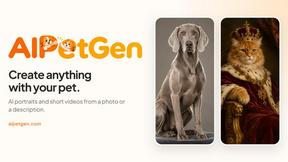
AIPetGen
AIPetGen turns a photo of your dog, cat, or other pet, or a written description, into a new picture or a short animation.




Chatit Me - Free Random Chat Alternative
Chat with random strangers online for free on ChatIt.me. Enjoy safe, anonymous, and instant 1-on-1 conversations with people worldwide

StyleCut
StyleCut is an AI hairstyle changer that lets you preview 70+ haircut ideas on your own photo before visiting the salon.