
KPI Studio
KPI Studio lets you paste raw data, customize a chart, and export a video-ready animation in under 60 seconds, no design skills needed.
Visit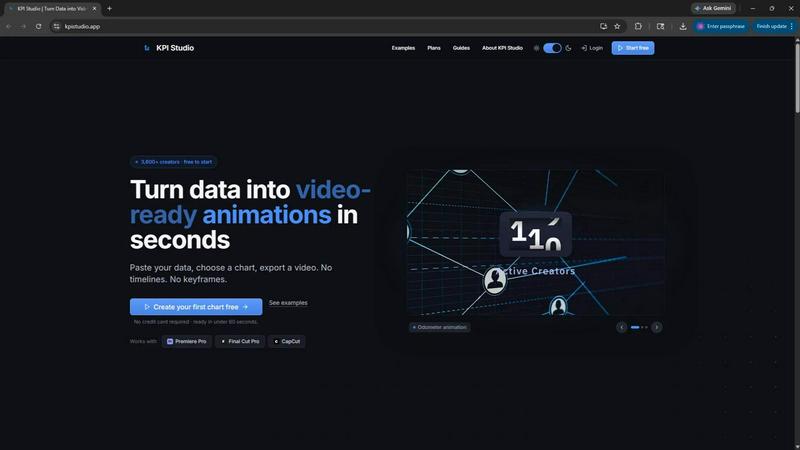
About KPI Studio
KPI Studio is a specialized software tool designed for data-driven video creators who need to incorporate animated charts and metrics into their content but lack the time or expertise for traditional motion design. The product addresses a fundamental gap in the video production workflow: turning raw data into polished, video-ready animations quickly and reliably. Instead of resorting to amateur-looking screenshots, inflexible templates in Canva, time-consuming manual animation in After Effects, or costly freelance motion designers, KPI Studio provides a streamlined, self-service alternative. Users simply paste their data, choose a chart type, customize the appearance, and export a fully animated visual in under 60 seconds. The tool eliminates the need for timelines, keyframes, or complex setup, making it accessible to creators of all skill levels. Exports support transparent backgrounds (MOV with alpha channel), allowing charts to be dropped directly into professional editing software like Premiere Pro, Final Cut Pro, and CapCut without any additional compositing work. KPI Studio is built for creators operating on a publish schedule who need the chart ready today, not tomorrow. With over 3,600 creators already using the platform, it has become a trusted solution for producing consistent, high-quality data visualizations that enhance viewer engagement and retention.
Features of KPI Studio
Rapid Data-to-Video Workflow
KPI Studio transforms the traditionally slow process of animating data into a simple three-step workflow: paste your data, customize the chart appearance, and export a video. This entire process is designed to be completed in under 60 seconds, eliminating the need for motion design expertise or complex software. Users can update data and re-export instantly without redoing any animation work.
Multiple Export Formats and Resolutions
The tool supports a comprehensive range of export formats including MP4, GIF, MOV with transparency, and PNG sequences. Users can choose from multiple aspect ratios such as 16:9 widescreen, 1:1 square, 9:16 stories, and 4:3 standard. Export resolutions go up to 4K for Pro subscribers, ensuring the output matches the quality requirements of any video editing project.
Transparent Background Support
One of the most valuable features for video editors is the ability to export charts with a transparent background using MOV with alpha channel or PNG with alpha. This allows the animated chart to be overlaid directly onto existing video footage, lower thirds, or presentation slides without any manual masking or keying work, saving significant post-production time.
Advanced JSON Export for Custom Pipelines
For users with more complex workflows, KPI Studio offers JSON export functionality. This allows the chart data and animation parameters to be exported in a structured format that can be further edited programmatically or integrated into custom video rendering pipelines. This feature is particularly valuable for teams that need to automate data visualization generation across multiple projects.
Use Cases of KPI Studio
YouTube and Social Media Content Creation
Data-driven creators on platforms like YouTube, Instagram, and TikTok use KPI Studio to produce engaging animated charts that explain metrics, compare performance, or reveal growth trends. The 9:16 aspect ratio is ideal for Stories and Shorts, while 16:9 works perfectly for standard YouTube videos. The rapid export time ensures creators can produce multiple data visualizations quickly for a single video or series.
Client Reporting and Presentation Videos
Agencies and freelancers producing client reports or case study videos benefit from KPI Studio's ability to generate professional animated charts in minutes. Instead of spending hours in After Effects or outsourcing to a motion designer, they can create polished count-up animations and bar charts that make client data more compelling and easier to understand during presentations or video walkthroughs.
eLearning and Educational Video Production
Educators and course creators use KPI Studio to animate statistical data, progress metrics, and comparison charts for instructional videos. The transparent background export allows charts to be seamlessly integrated into slide presentations or screen recordings, making complex data more accessible and visually engaging for students without requiring advanced design skills.
Internal Business Communications and Dashboards
Companies producing internal update videos, quarterly business reviews, or all-hands presentations can leverage KPI Studio to quickly animate key performance indicators. The tool enables non-designers in marketing, finance, or operations teams to create professional data visualizations that maintain brand consistency, without relying on the creative team for every chart update.
Frequently Asked Questions
What is KPI Studio and who is it for?
KPI Studio is a web-based tool that lets you turn raw data into animated, video-ready charts in under 60 seconds. It is built for data-driven video creators including YouTubers, social media managers, freelance video editors, eLearning producers, and marketing teams who need to include animated metrics in their content but do not have time for traditional motion design software like After Effects.
Do I need any design or animation experience to use KPI Studio?
No. KPI Studio is designed specifically to eliminate the need for timelines, keyframes, or any motion design knowledge. The workflow is simple: paste your data, choose a chart type, customize the look, and export. The software handles all the animation automatically. You can create professional-looking animated charts without any prior design experience.
What export formats and resolutions are available?
KPI Studio supports MP4, GIF, MOV with transparency (alpha channel), and PNG sequences. You can export in multiple aspect ratios including 16:9, 1:1, 9:16, and 4:3. Free users can export at standard definition, while Pro subscribers can export at up to 4K resolution. The transparent background exports are particularly useful for dropping directly into video editors like Premiere Pro, Final Cut Pro, and CapCut.
Can I update my data after creating a chart?
Yes. One of the key advantages of KPI Studio is that you can simply paste new data and re-export the chart instantly. There is no need to redo keyframes, adjust animation timing, or rebuild the visual from scratch. This makes it easy to keep your content current as metrics change, such as updating subscriber counts or monthly revenue figures.
Pricing of KPI Studio
KPI Studio offers three pricing tiers to accommodate different usage levels. The Free plan is available at $0 per month and includes unlimited PNG exports, 3 free animated exports, access to all chart types, and a real-time preview. The Creator Pack is a one-time purchase for $11.99 and includes everything in Free plus 10 video exports (GIF, MP4, WebM, and MOV), no watermark, 1080p export resolution, and credits that never expire. The Pro plan is $19.99 per month and includes everything in Free plus unlimited video exports, no watermark, 4K export resolution, and the ability to cancel anytime. All plans allow users to start without a credit card.
Similar to KPI Studio
VideoToScript
Turn TikTok, Reels, Shorts, Facebook videos, audio, and video into accurate timestamped transcripts with TXT, SRT, and VTT exports.


UGCad AI
AI UGC video ad Generator which Turn a URL, prompt, or template into a ready video ads
StopScroll
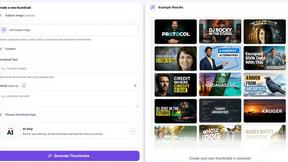
AI YouTube thumbnail maker that helps creators generate high-click thumbnails faster.



Sparqo AI
Sparqo AI is an AI marketing team that plans, writes, and distributes content across SEO and Reddit for your approval.

Masset
Masset is an AI-powered content hub that centralizes your business files so your team and AI tools tell your story accurately.