morsecode-translator
Morse code translator that encodes text, decodes audio and image inputs, and plays clean telegraph sound from one focused workspace.
VisitPublished on:
July 4, 2026
Pricing:
About morsecode-translator
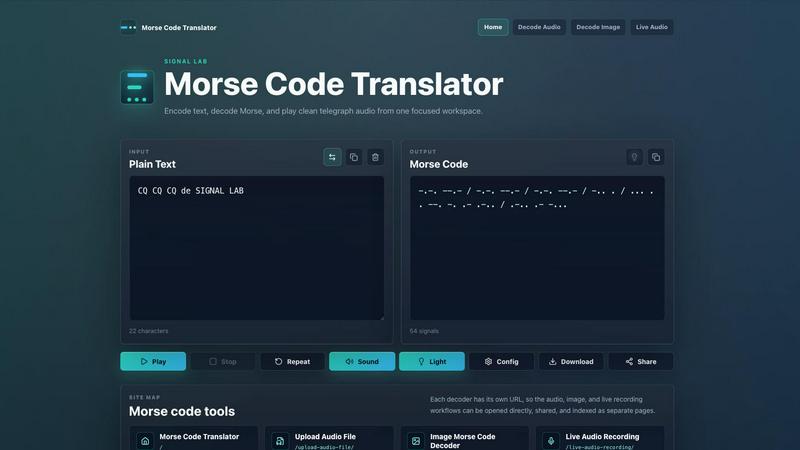
The morsecode-translator is a focused, all-in-one web-based workspace designed for encoding plain text into Morse code, decoding Morse code back into readable text, and playing back clean telegraph audio. This tool serves a diverse audience ranging from amateur radio operators and hobbyists to students learning Morse code and professionals who need a reliable, no-fuss translator. Its primary value proposition lies in consolidating multiple workflows - encoding, decoding, audio playback, image decoding, and live audio transcription - into a single, accessible interface. Unlike scattered online tools, morsecode-translator provides a unified workspace where a message can move from text to signal without leaving the browser. The product also offers dedicated pages for specialized tasks: uploading audio files for decoding, extracting Morse from high contrast images, and using a live microphone to build a real-time transcript. The interface is clean and minimal, featuring an input area for plain text or Morse signals and an output area that displays the translation alongside signal count, playback controls, and options to download or share the result. The tool is built with modern web technologies, using the Web Audio API for playback and supporting configurable parameters like words per minute (WPM), tone frequency, volume, repeat mode, and a synced light cue. By keeping the experience focused and professional, morsecode-translator eliminates the friction of switching between separate applications, making it an essential utility for anyone working with Morse code.
Features of morsecode-translator
Text to Morse Encoding
This feature allows users to type letters, numbers, and supported punctuation into the plain text input field. The translator instantly renders the corresponding International Morse code, placing one space between individual characters and a forward slash between complete words. The output area displays the total number of signals generated, giving the user immediate feedback on the length and structure of the encoded message. This real-time conversion is the core function of the tool.
Morse Code to Text Decoding
Users can switch the input mode to paste or type Morse code consisting of dots, dashes, spaces, and word separators. The decoder accurately translates the sequence back into plain text. Crucially, any unsupported tokens or invalid characters are not silently dropped; they are kept visible in the output with a marker, allowing the user to identify and correct errors in the original Morse input before proceeding.
Audio Playback with Configurable Timing
The playback engine uses the browser's Web Audio API to generate clean, artifact-free telegraph tones. Users can adjust the playback speed in words per minute (WPM), which proportionally shortens or lengthens the duration of dots, dashes, and the gaps between them. Additional controls include tone frequency, volume, and a repeat mode for continuous listening. A light cue can be synced to flash in time with every signal, providing a visual aid alongside the audio.
Multi-Format Input and Output
Beyond direct text entry, the tool provides three specialized decoder pages. The Upload Audio File feature allows users to decode Morse from WAV, MP3, M4A, OGG, or any other browser-supported audio format. The Image Morse Code Decoder extracts visible dots and dashes from a high contrast image file. The Live Audio Recording feature listens through the user's microphone and builds a live transcript from tone pulses in real time. All outputs can be copied, downloaded as a WAV file, or shared via a URL generated from the plain text message.
Use Cases of morsecode-translator
Amateur Radio Operation and Practice
Amateur radio operators frequently need to send and receive Morse code messages. This tool allows them to encode a planned transmission, verify the correct spacing and timing, and then use the audio playback to practice copying the code by ear. The configurable WPM settings let operators gradually increase their speed, while the live audio recording feature can be used to decode incoming signals from a radio receiver connected to the computer's microphone.
Educational Learning and Teaching
Students learning Morse code can use the translator as a study aid. By typing simple words or phrases like "HELLO WORLD" or "TEST 123", they can see the corresponding dots and dashes while simultaneously hearing the correct audio rhythm. Teachers can use the tool in a classroom setting to demonstrate the relationship between text and signal, and the light cue feature helps visual learners associate the pattern with the sound.
Emergency and Survival Preparedness
Morse code remains a valuable skill in emergency situations where voice communication may be impossible. Survivalists and preppers can use the tool to encode critical messages like "SOS" and practice sending them with a flashlight or improvised switch. The ability to download the audio as a WAV file allows for offline playback on a mobile device, ensuring the tool remains useful even without an internet connection after initial preparation.
Historical Research and Media Production
Historians, documentary filmmakers, and content creators working on projects related to telegraphy, maritime history, or early radio can use the translator to generate authentic Morse code audio. They can encode historical messages, adjust the tone to match period equipment, and download the resulting WAV file for integration into video, podcast, or interactive exhibits. The image decoder is also useful for analyzing old photographs or diagrams containing Morse signals.
Frequently Asked Questions
What input formats does the Morse code decoder accept?
The decoder accepts standard Morse code sequences composed of dots (.), dashes (-), and spaces. A single space is used to separate individual Morse characters, while a forward slash (/) is used to separate whole words. The tool is case-insensitive for the Morse input. For audio-based decoding, the tool supports WAV, MP3, M4A, OGG, and any other audio format that your web browser can natively play.
How does the audio timing work and what is WPM?
WPM stands for Words Per Minute, and it is the standard measure of Morse code speed. Changing the WPM value adjusts the base unit length for all elements. A higher WPM makes the dots, dashes, and the gaps between them shorter, resulting in faster playback. A lower WPM makes everything longer and slower. The tool uses a standard timing ratio where a dash is three times the length of a dot, and the gaps between characters and words are scaled proportionally.
Can I decode Morse code from a picture or an audio recording?
Yes, the tool provides dedicated pages for both of these tasks. The Image Morse Code Decoder allows you to upload a high contrast image file. The tool will attempt to extract the visible dots and dashes from the image and then decode the resulting sequence. The Upload Audio File decoder lets you upload a recording, and the tool will analyze the audio waveform for tone pulses to build a transcript.
Is there a way to share a translation with someone else?
Yes, the tool generates a unique URL based on the plain text message you have entered. You can copy this URL and share it with anyone. When they open the link, the translator will automatically load your message, showing both the plain text and the corresponding Morse code. This makes it easy to share specific examples or practice messages without having to manually describe the content.
Similar to morsecode-translator

AIPetGen
AIPetGen turns a photo of your dog, cat, or other pet, or a written description, into a new picture or a short animation.