PicExtender
PicExtender uses AI to expand, enhance, and restore images, letting you resize canvases, sharpen details, and revive old photos in one efficient.
Visit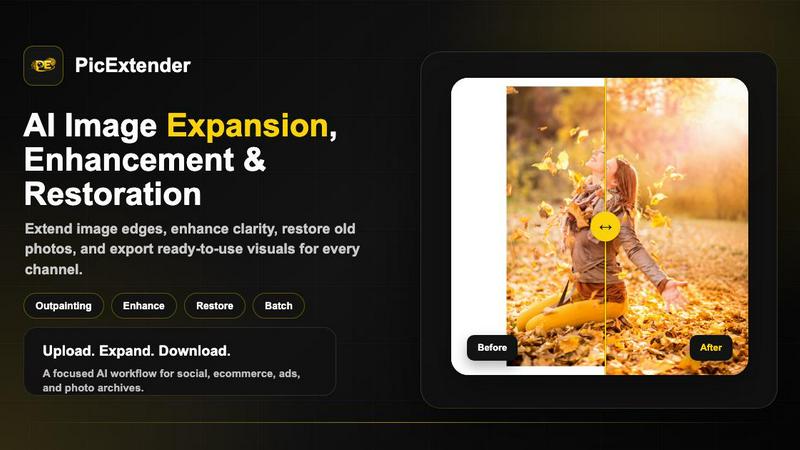
About PicExtender
PicExtender is an AI-powered image processing platform designed to streamline the expansion, enhancement, and restoration of digital visuals. The tool allows users to upload a single image and leverage artificial intelligence to complete missing edges, improve clarity, repair visual damage, and then export ready-to-use visuals for social media, e-commerce, advertising, and family archives. At its core, PicExtender addresses the common challenge of creating larger, sharper images without requiring tedious manual editing skills or complex software like Photoshop. The platform is built for photographers, graphic designers, e-commerce teams, and content creators who regularly need to resize images for different social media formats, enhance product photos for online stores, or restore old family photographs. What sets PicExtender apart is its unified workflow that combines multiple image processing capabilities into one focused tool. Users can expand image canvases, enhance detail and clarity, restore damaged photos, and even colorize black-and-white images all within the same interface. The platform supports common image formats including JPG, JPEG, PNG, and WEBP, and can expand images up to 4096 by 4096 pixels for high-resolution creative work. With context-aware generation technology, PicExtender studies edge lighting, colors, and textures before filling new canvas areas with realistic detail, ensuring that expanded areas blend naturally with the original image. The tool also offers batch processing capabilities, allowing users to prepare entire product sets or campaign libraries with consistent output settings, significantly reducing the time spent on repetitive resizing tasks.
Features of PicExtender
Seamless AI Image Expansion
PicExtender uses context-aware generation technology to intelligently expand image canvases. The AI studies the edge lighting, colors, and textures of the original image before filling new canvas areas with realistic detail that matches the surrounding content. This ensures that expanded areas do not look artificial or stretched, but instead blend naturally with the original image. Users can choose from preset aspect ratios for popular social media formats or specify custom dimensions, making it easy to adapt images for different platforms without distorting the main subject.
High-Resolution Output Up to 4K
The platform supports image expansion up to 4096 by 4096 pixels, enabling users to create high-resolution canvases suitable for professional applications. This feature is particularly valuable for creating print-ready assets, high-quality product images for e-commerce, and large format visuals for advertising campaigns. The ability to generate 4K output ensures that expanded images maintain sharpness and detail even when viewed on large screens or printed at scale, eliminating the pixelation and blur that often accompany manual resizing.
Efficient Batch Outpainting
PicExtender offers batch processing capabilities that allow users to prepare multiple images simultaneously with consistent output settings. This feature is designed for professionals who need to process entire product sets, campaign libraries, or social media content packages. Instead of resizing and expanding images one by one, users can upload multiple files, apply the same expansion parameters, and download all processed results in a single workflow. This dramatically reduces editing time and ensures uniformity across a set of images.
AI Photo Restoration and Colorization
Beyond expansion, PicExtender includes powerful photo restoration tools that can detect and repair common damage in old photographs, including scratches, creases, stains, fading, and blur. The AI analyzes the image to recover missing details and restore visual quality. Additionally, the platform offers colorization capabilities that add natural color to black-and-white photos, applying appropriate hues to skin tones, clothing, and environmental elements. This combined restoration and colorization workflow makes it easy to revive and modernize vintage photographs.
Use Cases of PicExtender
Social Media Content Optimization
Content creators and social media managers frequently need to adapt images for different platform formats, such as Instagram posts, Facebook covers, LinkedIn banners, YouTube thumbnails, and Twitter headers. PicExtender simplifies this process by allowing users to upload a single image and expand it to fit any required aspect ratio. The AI intelligently fills the new canvas areas with contextually appropriate background content, ensuring that the main subject remains intact and the expanded areas look natural. This eliminates the need to create multiple versions of the same image from scratch.
E-commerce Product Photography Enhancement
E-commerce teams and online store owners can use PicExtender to improve product photos for listings, catalogs, and advertising campaigns. The platform can sharpen product images, enhance lighting and edges, and improve the clarity of packaging, labels, and surface textures. Additionally, the image expansion feature allows users to add clean backgrounds and safe margins around products without distorting the item itself. This results in more professional-looking product visuals that can increase customer trust and conversion rates on platforms like Amazon, Shopify, and Etsy.
Photography Restoration for Personal Archives
Individuals and archivists can use PicExtender to restore and preserve old family photographs that have suffered damage over time. The AI can detect and repair scratches, creases, stains, and other imperfections, recovering missing details and improving overall image quality. After restoration, users can also colorize black-and-white photos to bring them to life for sharing, printing, or archiving. This makes PicExtender a valuable tool for preserving family history and creating digital versions of precious memories that can be easily shared with relatives.
Content Creation for Marketing and Design
Graphic designers and marketing professionals can leverage PicExtender to extend backgrounds for various creative projects, including anime art, cartoons, thumbnails, advertisements, and design concepts. The ability to expand canvases naturally without distorting the main subject allows designers to create more flexible layouts that accommodate text, logos, and other design elements. The tool also supports AI image editing with prompts, enabling users to change scenes, replace backgrounds, or adjust moods and lighting based on simple text descriptions, which speeds up the creative iteration process.
Frequently Asked Questions
What image formats does PicExtender support?
PicExtender supports JPG, JPEG, PNG, and WEBP image formats. Users can upload any of these file types for processing. However, it is important to note that the platform does not support transparent background images, so PNG files with transparency may not work correctly. For best results, users should upload images with solid backgrounds or standard photographic content.
How large can I expand my images with PicExtender?
PicExtender allows users to expand images up to 4096 by 4096 pixels, which is equivalent to 4K resolution. This enables the creation of high-resolution canvases suitable for professional applications such as print materials, large format advertising, product pages, and high-definition social media content. The AI ensures that expanded areas maintain realistic detail and blend seamlessly with the original image content.
Is PicExtender suitable for batch processing multiple images?
Yes, PicExtender offers efficient batch outpainting capabilities that allow users to process multiple images simultaneously. This feature is designed for professionals who need to prepare entire product sets, campaign libraries, or social media content packages with consistent output settings. Instead of editing images one by one, users can upload multiple files, apply the same expansion parameters, and download all processed results in a single workflow, saving significant time and ensuring uniformity.
Can PicExtender restore and colorize old black-and-white photos?
Yes, PicExtender includes both photo restoration and colorization features. The restoration tool can detect and repair common damage in old photographs, including scratches, creases, stains, fading, and blur. After restoration, the colorization feature can add natural color to black-and-white images, applying appropriate hues to skin tones, clothing, and environmental elements. This combined workflow makes it easy to revive and modernize vintage photographs for sharing, printing, or archiving.
Pricing of PicExtender
PicExtender offers a Basic plan priced at $9.9 per month, designed for light uncropping and daily social media asset creation. New users can start with free credits to explore the platform before upgrading to a paid plan when they need higher resolution output or batch processing capacity. The pricing structure is straightforward, allowing users to scale their usage based on their specific needs without committing to expensive long-term contracts.
Similar to PicExtender

FreeVideoGenerator
Free AI video generator: turn text prompts and photos into video clips with Sora 2, Veo 3.1, Wan and more. Free starter credits, no watermark download

Riff
Free Chrome extension. Paste your rough point and Chrome's built-in AI writes a fresh reply for that post on X, LinkedIn, Facebook or Instagram.
AIPetGen
AIPetGen turns a photo of your dog, cat, or other pet, or a written description, into a new picture or a short animation.

WidgIq
Provide an AI-powered customer support widget for your website