RoomCreator
RoomCreator instantly transforms your room photos into stunning AI designs with no skills required.
Visit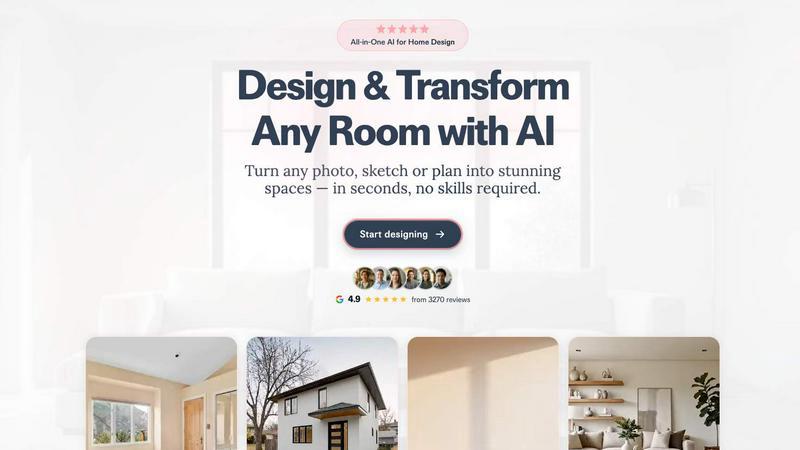
About RoomCreator
RoomCreator is an all-in-one AI-powered home design platform that empowers homeowners, DIY enthusiasts, and real estate professionals to visualize and transform any space with unprecedented speed and ease. At its core, RoomCreator simplifies the design process by allowing users to upload a simple photo of a room—whether it's a kitchen, bedroom, living room, or exterior—and receive multiple, hyper-realistic redesign concepts in as little as 10 seconds. The platform eliminates the need for advanced design skills or expensive professional services, making sophisticated visualization accessible to everyone.
The tool's primary value proposition lies in its ability to turn abstract ideas into concrete, photorealistic visuals. Users can experiment with smart layout changes, new color palettes, furniture arrangements, and complete style makeovers without any financial commitment or renovation work. This enables confident decision-making before purchasing a single item or hiring a contractor. RoomCreator caters to a wide audience, including homeowners planning renovations, real estate agents looking to enhance property listings, and individual investors assessing a property's potential. With a suite of specialized tools for interiors, exteriors, and precise edits, RoomCreator is the fastest and most intuitive way to bridge the gap between imagination and reality in home design.
Features of RoomCreator
Instant Interior Redesign
This flagship feature allows you to upload a photo of any interior space and instantly generate professionally designed makeovers. The AI analyzes your room's dimensions and features, then applies a wide range of styles—from Modern and Scandinavian to Bohemian and Japandi—showing realistic changes to furniture, colors, lighting, and layouts. This provides a comprehensive visual preview to inform your design decisions accurately before any physical changes begin.
Exterior Design Visualizer
Test and visualize changes to your home's exterior with a single photo. This tool enables you to experiment with different paint colors, siding materials, roofing styles, and landscaping elements. It's an essential resource for planning repainting projects, renovations, or enhancing curb appeal for real estate listings, offering a risk-free way to see the potential impact on your home's appearance.
Precision Brush Editor
Gain detailed control over your designs with the Brush Editor (Inpaint Tool). Instead of regenerating an entire room, you can simply brush over specific areas—like a piece of furniture or decor—to remove or replace it. This allows for targeted edits and fine-tuning, giving you the flexibility to perfect your vision without starting the design process from scratch every time.
Empty Room Generator
Instantly declutter any space by removing all furniture and objects from your uploaded photo with a single tap. This feature leaves the architectural elements—walls, floors, windows—intact, providing a clean, empty canvas. It's perfect for visualizing the true potential of a space, planning layouts from scratch, or preparing a room for a completely new design concept.
Use Cases of RoomCreator
Home Renovation Planning
Homeowners can use RoomCreator to plan and visualize renovations or redecorations with zero risk. By uploading a photo of their current kitchen, living room, or bedroom, they can test various styles, color schemes, and furniture arrangements. This helps in making confident, informed decisions, avoiding costly mistakes, and ensuring the final result aligns with their vision before any work commences.
Real Estate Listing Enhancement
Real estate agents can transform empty, cluttered, or outdated property photos into beautifully staged and modern interiors. This visual enhancement makes listings significantly more attractive to potential buyers online, helping properties stand out in a competitive market. It provides a cost-effective alternative to physical staging and professional photography.
Investment Property Analysis
Individual real estate investors and house flippers can use RoomCreator to evaluate a property's renovation potential and visualize the after-renovation value. By generating realistic "after" images, they can better plan projects, allocate budgets, and create compelling presentations for partners or lenders to showcase the future potential and increased valuation of an investment.
Interior Design Concept Development
DIY lovers and design enthusiasts can use the platform to experiment with their creative ideas. Whether starting from a hand-drawn sketch, an empty room, or an existing space, users can rapidly iterate through different themes and layouts. This turns the tool into a personal design lab for exploring personal style and finalizing concepts for any room in the house.
Frequently Asked Questions
How does RoomCreator work?
The process is straightforward and requires no design expertise. First, you upload a photo of your room—even messy or low-quality images are accepted. Next, you select a desired design style from a broad library of themes. Finally, RoomCreator's AI processes your image and generates multiple hyper-realistic redesign previews in about 10 seconds, allowing you to see a complete visual transformation instantly.
Is RoomCreator free to use?
Yes, RoomCreator offers a free trial to get started. New users receive free credits upon signing up, which can be used to test the core features without requiring a credit card. This allows you to experience the platform's capabilities and generate several designs before deciding to upgrade to a paid plan for more extensive use.
What kind of photos work best with RoomCreator?
RoomCreator is designed to be flexible. You can upload photos of occupied rooms, empty spaces, or even rough hand-drawn sketches. For best results, ensure your photo is well-lit and captures the entire area you wish to redesign. However, the AI is robust enough to work with a variety of image qualities, making the tool accessible for most users.
Can I edit specific parts of the AI-generated design?
Absolutely. RoomCreator includes a Precision Brush Editor (Inpaint Tool) specifically for this purpose. If you like a generated design but want to change a particular item, like a sofa or artwork, you can simply brush over that area and instruct the AI to replace or remove it. This gives you detailed control without regenerating the entire room design.
Similar to RoomCreator

Orlyn
Privacy-first, cookieless web analytics that ties your traffic and marketing channels to real Stripe revenue.

tallycounterweb.com
Tally Counter is a simple online counting tool for tracking attendance, workouts, inventory, sports scores, visitors, and everyday activities.

PDFKing
Free online PDF tools to merge, compress, convert, edit, sign, and manage documents—no signup, watermarks, or daily limits.



Wisegrid
Wisegrid helps project-driven teams manage projects, workflows, resources, and reporting in a familiar spreadsheet-style workspace.