
Vibeworker
Vibeworker uses AI to instantly score every new Upwork job against your profile and strategy, so only the best opportunities reach you.
Visit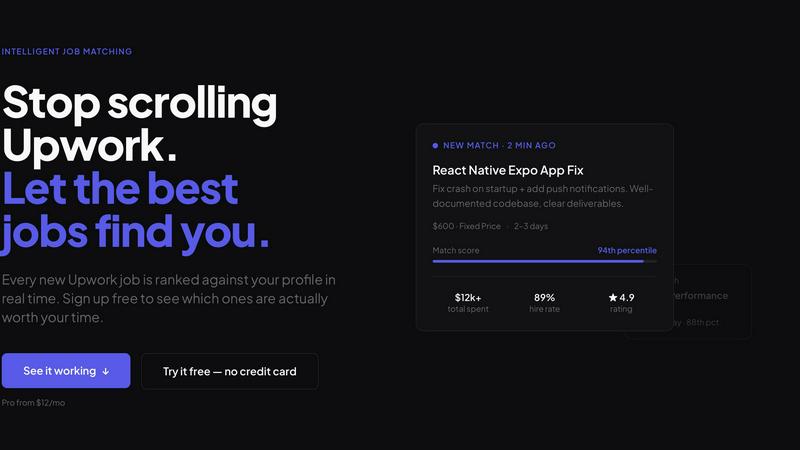
About Vibeworker
Vibeworker is an intelligent job matching platform designed specifically for freelancers who use Upwork. It solves the fundamental problem of wasted time and missed opportunities by continuously monitoring every new job posted on Upwork in real time and ranking each one against your personal profile across multiple critical dimensions. These dimensions include skill fit, scope clarity, client quality, and potential red flags. Instead of manually scrolling through the raw Upwork feed and sifting through hundreds of irrelevant listings, freelancers set their profile once and then browse a curated feed sorted by a personal match score. This score reflects how well a job aligns with the freelancer's specific strategy, whether that is finding quick fixed-price tasks, high-value contracts, or well-scoped projects for building a reputation. When a strong match is identified, Vibeworker sends an instant alert through push notification, Telegram, RSS, or webhook, and even provides a pre-drafted proposal ready for submission. The platform was built by Michael Watkins, a freelancer who became tired of the inefficient Upwork browsing experience. Vibeworker applies the same matching technology used by platforms like Google, Netflix, and Spotify to the freelance job market, ensuring that freelancers see opportunities within minutes of them being posted. This speed advantage is critical, as good jobs on Upwork often receive dozens of proposals within the first hour. Vibeworker is designed for freelancers who are serious about winning work efficiently, not just browsing through endless listings.
Features of Vibeworker
Real-Time Intelligent Job Scoring
Vibeworker continuously analyzes every new Upwork posting within two to five minutes of it going live. The system reads the full job description and evaluates it against your profile using multiple signals, including skill fit, scope clarity, client quality, and risk indicators. Each job is assigned a percentile-based match score, allowing you to immediately see which opportunities are actually worth your time and effort.
Customizable Opportunity Strategies
The platform offers three distinct matching modes that you can switch between based on your current goals. Quick Wins mode focuses on finding fast, well-scoped tasks with clear deliverables for building reviews. Skill Match mode aligns jobs with your specific expertise and experience. High Value mode surfaces larger contracts from verified, high-spend clients, allowing you to be selective.
Instant Multi-Channel Alerts
When Vibeworker identifies a job that strongly matches your profile and strategy, it sends an immediate notification through your preferred channel. You can receive alerts via push notifications on your device, Telegram messages, RSS feeds, or custom webhooks. Each alert includes a pre-drafted proposal that is ready for you to review and submit, saving critical time.
Comprehensive Job Signal Analysis
Unlike traditional keyword-based job alerts that send hundreds of irrelevant listings, Vibeworker performs deep signal analysis. It evaluates whether a job has clear deliverables, assesses client quality based on their track record, identifies potential risk indicators like vague scope or unrealistic expectations, and measures scope clarity. This ensures you only see opportunities that are genuinely good to take.
Use Cases of Vibeworker
Building a Freelance Reputation from Scratch
New freelancers on Upwork often struggle to find the right first projects. Vibeworker's Quick Wins mode is perfect for this scenario. It identifies well-scoped, fixed-price tasks with clear deliverables and realistic clients. These are the kind of projects that are easy to complete successfully, leading to five-star reviews and repeat business. The platform helps new freelancers stack positive feedback quickly without getting trapped in vague or difficult projects.
Finding High-Value, Long-Term Contracts
Experienced freelancers who want to maximize their income can use the High Value mode. This feature filters out lower-paying or less serious opportunities and surfaces only larger contracts from verified clients with a proven history of spending on the platform. Vibeworker cuts through the noise for freelancers who can afford to be selective, directing their attention to serious clients worth significant time and attention.
Avoiding Scope Creep and Problematic Clients
Many freelancers waste time on projects that start simple but expand in scope without additional pay. Vibeworker's analysis includes red flag detection and scope clarity assessment. Freelancers can avoid vague projects from unvetted clients by relying on the platform's risk indicators. This use case is about protecting your time and energy by only applying to opportunities that are clearly defined and offered by reputable clients.
Maximizing Speed for Competitive Listings
On Upwork, the first freelancers to apply often have a significant advantage. Vibeworker is built for speed. It detects new jobs within minutes of posting and sends instant alerts. A freelancer can receive a notification, review the pre-drafted proposal, and submit their application before most other freelancers even know the job exists. This use case is critical for winning highly competitive listings that attract many proposals quickly.
Frequently Asked Questions
How does Vibeworker differ from standard Upwork job alerts?
Standard Upwork alerts are typically keyword-based, sending you a notification whenever a job contains a specific word like "React" or "Python." This approach often results in hundreds of irrelevant listings that match your skills but are terrible opportunities due to poor scope, low pay, or problematic clients. Vibeworker goes much deeper by analyzing the full job description, evaluating client quality, scope clarity, and risk indicators, then ranking jobs against your personal profile and strategy.
Do I need to keep my profile updated constantly?
No. Vibeworker is designed for a one-time setup. You configure your profile and your preferred opportunity strategy once, and the system continuously works in the background. As new jobs are posted on Upwork, Vibeworker automatically scores them against your existing profile. You can switch between different matching modes like Quick Wins or High Value at any time without needing to rebuild your profile.
How fast does Vibeworker detect new Upwork jobs?
Vibeworker picks up new job postings within two to five minutes of them appearing on Upwork. This speed is critical because good jobs on Upwork often receive dozens of proposals within the first hour. By seeing opportunities almost immediately and receiving a pre-drafted proposal, you gain a significant competitive advantage over freelancers who rely on manual searching or slower alert systems.
What kind of alerts can I receive?
Vibeworker offers multiple alert channels to ensure you never miss a strong match. You can receive instant push notifications directly on your device, messages through Telegram, updates via an RSS feed, or custom notifications through a webhook. Each alert includes key details about the job, the match score, and a pre-drafted proposal that you can review and submit with minimal effort.
Similar to Vibeworker
Kody Tools
Free collection of online developer utilities, code formatters, and digital converters designed to streamline your daily workflow.
Forms Plugin
The #1 Native Form Builder Plugin for Framer - No Code, No Embeds, No External Platforms.

tallycounterweb.com
Tally Counter is a simple online counting tool for tracking attendance, workouts, inventory, sports scores, visitors, and everyday activities.

iHatePosting
Create once, tailor for each platform, and schedule posts across 14 social networks from one simple dashboard.
PDFWix
PDFWix is a free online PDF toolkit designed to make everyday PDF tasks simple, fast, and private.
PDFKing
Free online PDF tools to merge, compress, convert, edit, sign, and manage documents—no signup, watermarks, or daily limits.
