PixUnblur
PixUnblur uses AI to sharpen blurry photos, restoring detail and clarity while preserving a natural look for sharing or printing.
Visit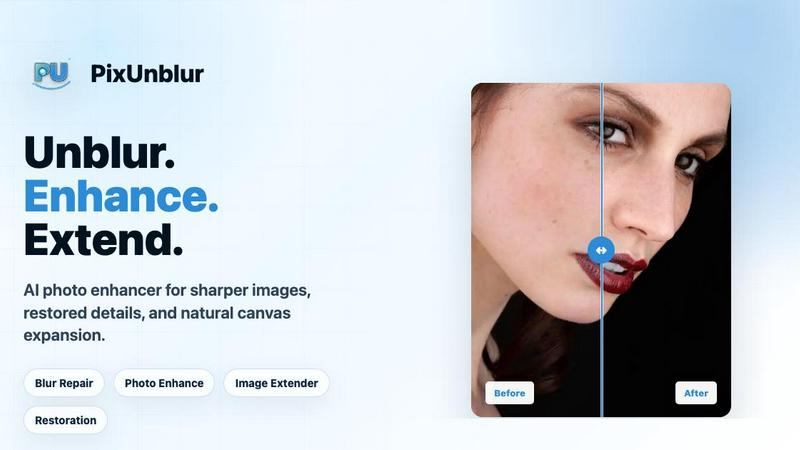
About PixUnblur
PixUnblur is a sophisticated AI-powered photo enhancement and sharpening tool designed to restore clarity to blurry, soft, or low-resolution images. By leveraging advanced artificial intelligence algorithms, PixUnblur analyzes the unique characteristics of each photo, including camera shake, missed focus, compression artifacts, and low-resolution softness, to deliver crisp, detailed results in seconds. The tool is built for a wide range of users, from professional photographers and graphic designers who need to salvage important shots, to everyday users looking to improve personal photos for social media or printing. Its core value proposition lies in its ability to turn unusable, blurry images into clear, natural-looking photographs without requiring any manual editing skills or complex software. Unlike traditional sharpening tools that can introduce harsh artifacts, halos, or unnatural textures, PixUnblur focuses on preserving the original subject, framing, colors, and overall feel of the image. The platform supports common formats like JPG, PNG, and WebP, and offers a streamlined workflow that includes batch processing, making it ideal for high-volume tasks such as e-commerce product photography, event coverage, or content creation for blogs and social media. With a commitment to delivering high-resolution output suitable for both digital and print use, PixUnblur stands as a comprehensive solution for anyone who needs to recover detail and clarity from blurry photos quickly and effectively.
Features of PixUnblur
AI-Powered Blur Repair and Detail Restoration
PixUnblur uses advanced artificial intelligence to analyze blurred areas, subject edges, and noise patterns within an image. It then applies a combination of sharpening, denoising, and detail recovery techniques to restore clarity while maintaining a natural look. The system intelligently distinguishes between different types of blur, such as motion blur from camera shake or softness from missed focus, and applies the most appropriate correction. This feature ensures that even heavily degraded images can be transformed into clear, usable photos without the need for manual adjustments or complex software.
Intelligent Noise Reduction and Texture Recovery
The tool excels at minimizing digital noise and grain while simultaneously recovering fine textures and subtle details. In low-light or high-ISO images, noise can obscure important features and create an unnatural appearance. PixUnblur's AI reduces this noise without sacrificing sharpness, and it actively works to restore lost textures in areas like skin, fabric, and natural landscapes. The result is a cleaner, more lifelike image where subjects appear crisp and backgrounds remain smooth, avoiding the plastic or overly smoothed look common with basic noise reduction tools.
High-Resolution Output for Print and Digital Use
PixUnblur generates high-quality, high-resolution output that is suitable for a variety of applications. Whether the final image is intended for professional printing, online publishing, product listings, or long-term storage, the tool ensures that the enhanced photo retains sufficient detail and clarity. The AI focuses on controlling edge halos, preventing plastic skin effects, and avoiding fake HDR artifacts, so the repaired image looks natural and professional. This makes PixUnblur a reliable choice for users who need results that meet the standards of commercial or high-quality personal projects.
Batch Processing and Streamlined Workflow
Designed for efficiency, PixUnblur offers a batch processing feature that allows users to enhance multiple images simultaneously. The intuitive interface, available on both Web and Mobile platforms, simplifies the entire workflow from upload to download. Users can drag and drop images, let the AI process them in the background, and then preview and download the results. This capability is particularly valuable for photographers, e-commerce managers, and content creators who need to process large volumes of images quickly, saving significant time and effort compared to manual editing.
Use Cases of PixUnblur
Fixing Soft Portraits and Headshots
PixUnblur is highly effective at restoring clarity to soft portraits, where camera shake, missed focus, or social media compression can obscure important facial features. The AI brings back clearer eyes, hair, and facial contours while reducing the effects of motion blur and low-light focus issues. This makes it an ideal tool for improving profile photos, professional headshots, and personal page images, ensuring that subjects appear sharp and presentable without losing their natural appearance.
Repairing Low-Light and Night Photography
Night shots, indoor photos, and party pictures often suffer from a combination of softness, digital noise, and lost shadow detail. PixUnblur addresses these issues by reducing grain and strengthening key edges while preserving the original mood and atmosphere of the scene. The tool can transform dimly lit, noisy images into clearer, more usable photos, making it a valuable resource for anyone who captures memories in challenging lighting conditions, from casual users to event photographers.
Enhancing Travel and Landscape Photography
Travel and landscape photos frequently suffer from missed focus, soft distant details, gray haze, and low-detail scenery, especially when captured with smartphones or compact cameras. PixUnblur improves clarity in mountains, coastlines, city views, and outdoor shots, making them suitable for albums, blogs, and social posts. By restoring sharpness to far-off elements and reducing atmospheric haze, the tool helps users salvage memorable travel shots that might otherwise be discarded due to blur.
Clarifying Product Images for E-Commerce
For e-commerce and catalog photography, clear product images are essential for building trust and driving sales. PixUnblur clarifies product edges, material textures, and small details while reducing compression blur that often occurs during upload and sharing. This makes product images look more trustworthy and professional, helping businesses present their items in the best possible light without investing in expensive photography equipment or time-consuming retouching.
Frequently Asked Questions
What is AI blur repair and how does it work?
AI blur repair is a technology that uses artificial intelligence to analyze and correct blurry, out-of-focus, or low-resolution images. It works by examining the image for patterns of softness, camera shake, compression artifacts, and noise. The AI then applies a series of restoration techniques, including sharpening, denoising, and detail recovery, to produce a clearer and more natural result. PixUnblur automates this entire process, requiring only the user to upload an image and download the enhanced version.
What kinds of blurry photos can it fix?
PixUnblur can fix a wide variety of blurry photos, including those caused by camera shake, missed focus, motion blur, low-light conditions, and compression artifacts. It is effective on soft portraits, noisy night shots, out-of-focus travel landscapes, compressed product images, and everyday lifestyle photos. The tool is designed to handle common sources of blur and degradation, making it suitable for both casual snapshots and professional content.
How long does it take to make a blurry photo clear?
The time required to process a blurry photo with PixUnblur is typically very short, often just a few seconds. The exact duration depends on the size and complexity of the image, as well as the current server load. The tool is optimized for speed and efficiency, allowing users to upload an image and receive a clear, enhanced result in near real-time. Batch processing is also available for users who need to improve multiple images at once.
Will AI blur repair change the original photo's appearance?
No, PixUnblur is designed to preserve the original subject, framing, colors, and natural feel of the image. The AI focuses solely on improving clarity and readability by reducing blur, noise, and artifacts. It avoids harsh sharpening, plastic skin effects, and unnatural HDR looks, ensuring that the repaired image remains true to the original while being significantly clearer and more detailed.
Pricing of PixUnblur
PixUnblur offers a tiered subscription model to accommodate different user needs, from light personal use to high-volume batch production. New users can start with free credits to test the service before upgrading.
The Basic plan is priced at $9.9 per month and is designed for light uncropping and daily social media assets. It includes 2400 yearly credits (up to 240 images), batch processing, no watermark, a commercial license, and email support.
The Creator plan, priced at $24.9 per month, is aimed at creators and small teams. It offers 6600 yearly credits (up to 660 images), batch processing, no watermark, a commercial license, and priority support.
The Master plan, at $49.9 per month, is intended for high-volume batch production. It includes 14400 yearly credits (up to 1440 images), batch processing, no watermark, a commercial license, and priority support.
Explore more in this category:
Similar to PixUnblur

FreeVideoGenerator
Free AI video generator: turn text prompts and photos into video clips with Sora 2, Veo 3.1, Wan and more. Free starter credits, no watermark download
Riff
Free Chrome extension. Paste your rough point and Chrome's built-in AI writes a fresh reply for that post on X, LinkedIn, Facebook or Instagram.
AIPetGen
AIPetGen turns a photo of your dog, cat, or other pet, or a written description, into a new picture or a short animation.

WidgIq
Provide an AI-powered customer support widget for your website